Switch from ChatGPT: a team migration guide
How to switch your team from ChatGPT to a European AI: export history, move custom GPTs, update the policy, pilot, roll out and cancel without chaos.
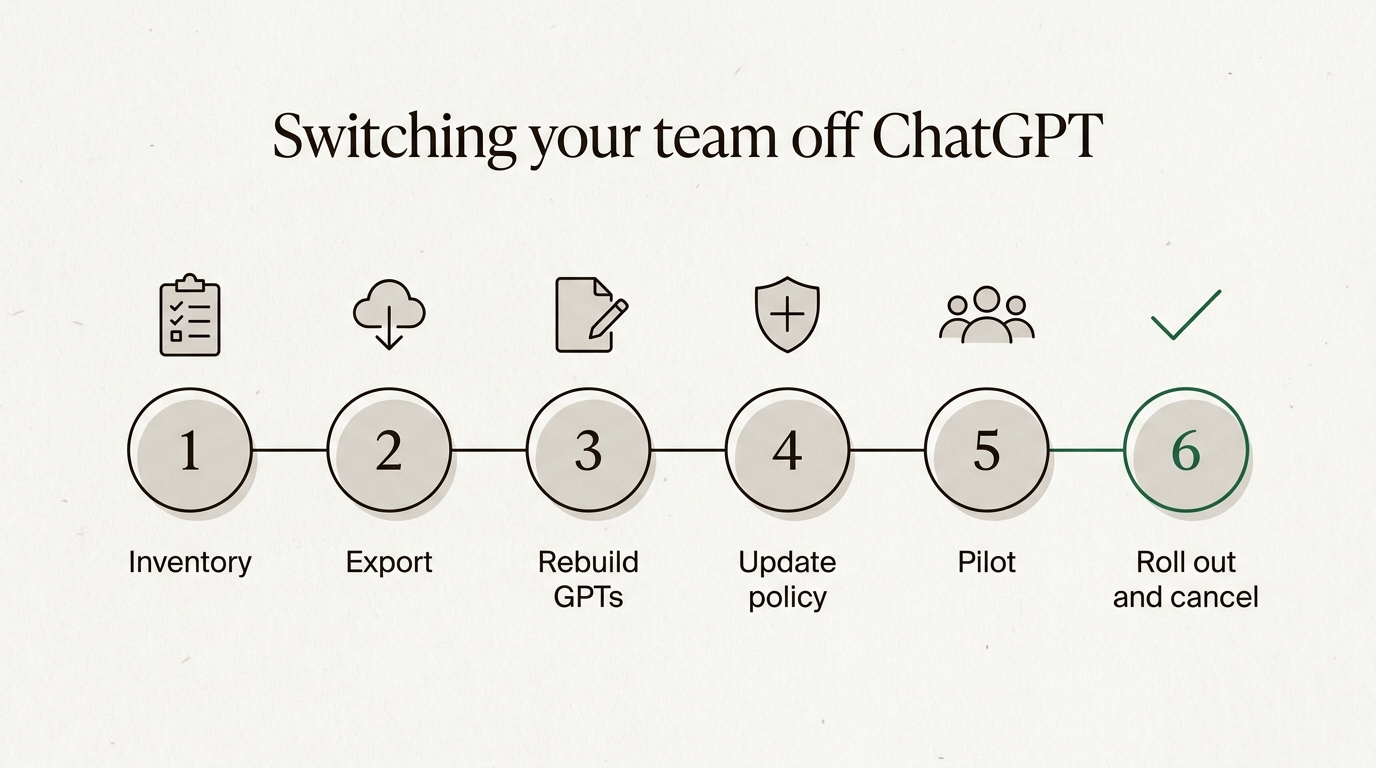
To switch your team from ChatGPT, treat it as a small change project, not a software install. Take stock of who uses ChatGPT for what, export the history you need, move custom GPT instructions into saved prompts, update your AI usage policy, pilot with a handful of people, roll out in waves, and cancel ChatGPT on your renewal date. For a team of ten to fifty people that is four to seven weeks, and the API part, if you have one, is a three-line change.
The hard part is not technical. It is the forty colleagues who liked the old tool and the three custom GPTs nobody wrote down. This guide covers both.
This post assumes you have already decided. If you are still comparing options, start with the European alternative to ChatGPT or the ranked list of the best European AI chatbots, and come back when you have picked one.
Why do teams get stuck switching from ChatGPT?
Because the decision is easy and the move is not. Most teams that want to leave ChatGPT have a clear reason: the data goes to a US provider, the legal team has questions about the GDPR and company data, or the bill grew with every new seat. Then nothing happens for six months.
Three things usually block it:
- Nobody knows what is in use. ChatGPT spread through the company one personal account at a time. Nobody has a list of who uses it, for what, or which custom GPTs the sales team built last spring.
- People fear losing their history. Months of conversations feel like a filing cabinet, even when nobody opens them.
- No one owns the switch. IT thinks it is a policy question, legal thinks it is an IT question, and the renewal date quietly passes.
The fix is to give the switch an owner and a calendar. Everything below is a step on that calendar.
Where do you start? Take stock of how your team uses ChatGPT
Start with an inventory: a plain list of who uses ChatGPT, on which plan, for which tasks, and with which custom GPTs or files. Without it you cannot tell what the new tool has to cover, and you will find out in week five.
For a team under ten, a ten-minute conversation is enough. Above that, send a five-question form:
- Which ChatGPT account do you use for work: company, personal, or both?
- What are the three tasks you use it for most?
- Which custom GPTs do you use, and who built them?
- Do you upload files? What kind?
- Do you use image generation, voice or deep research?
The second question matters most. In most teams the answers cluster around the same five tasks: drafting email, rewriting text, summarising documents, answering questions and some light analysis. That is good news, because those carry over to any competent chatbot.
The personal accounts matter too. If people use ChatGPT on their own Plus plan, that is shadow AI, and it needs to be part of the switch, not left running beside it. We wrote about why that happens in not allowed to use ChatGPT at work.
How do you export your ChatGPT data?
On a personal plan you export from ChatGPT itself. According to OpenAI's help article on exporting your ChatGPT history, the steps are:
- Sign in and open your profile menu.
- Go to Settings, then Data controls.
- Under Export data, select Export, then Confirm export.
OpenAI sends an email when the export is ready. That can take up to 7 days, and the download link expires 24 hours after it arrives, so tell people to watch their inbox. The ZIP file contains your chat history and other account data. It cannot bring back chats you already deleted.
If you use a ChatGPT Business, Enterprise, or ChatGPT for Healthcare workspace, contact your workspace owner about organization-managed data access. Self-service export is not available in these workspaces.
That passage from the same article catches many teams out. Export from settings works for Free, Go, Plus, Pro and eligible Edu accounts. In a Business workspace, data access is managed by the organisation, not by each member. So if your company pays for ChatGPT Business, decide as an organisation what you need to keep before anyone cancels anything.
Do you actually need the history?
Probably less than you think. An export is an archive, not something another chatbot loads as live conversations, and Union AI does not import ChatGPT history. What people really reuse is small: a prompt that works, a template for a customer reply, a reference answer they checked once. Ask each person to save those five or ten things as text. Keep the full export, if you have one, somewhere searchable for the rare time someone needs it.
Treat the export file with care. It contains everything people ever pasted, which may include customer data you would rather not have lying around in a download folder.
How do you move custom GPTs to a European AI?
You move the content, not the GPT. A custom GPT only runs inside ChatGPT, but everything that makes it useful is text and files you can copy. Open each GPT in the editor and copy out its fields. OpenAI's GPT builder documentation lists what a GPT is made of, and each part has a destination:
| GPT field | What it does | Where it goes in Union AI |
|---|---|---|
| Instructions | How the GPT behaves | A saved template, or the brief of your tailored assistant |
| Conversation starters | Example first prompts | Saved templates, one per starter |
| Knowledge files | Reference documents | The Company knowledge add-on, attached per chat, or picked from Google Drive or OneDrive |
| Capabilities | Web search, image generation | Web search: the Search switch in the chat, with numbered sources. Image generation: no equivalent |
| Actions and apps | Calls to external APIs | Build it on the API instead |
In Union AI chat, a saved template is a prompt you name and keep, up to 8,000 characters, one click from a new chat. Paste the GPT's instructions into it, end with a line like "The task:", and the template works like the GPT did. There is also a library of a hundred prompts by profession, for marketing, sales, HR, finance, legal, support and more, which often covers what a simple GPT did. And the onboarding builds a tailored assistant from a short conversation about your work, with its own brief and suggestions.
Test every rebuilt GPT on three real tasks from the person who uses it most. The instructions will need small edits, because a different model reads the same words slightly differently.
There is a second reason to do this now. OpenAI's own help centre says it plans to retire custom GPTs and move people to plugins, with retirement for affected Enterprise workspaces planned for 11 December 2026 and other plans expected to follow. So your GPTs are moving somewhere this year regardless. Moving them once, to a tool you chose, beats moving them twice.
What changes in your AI usage policy?
Your AI usage policy is the document that tells staff which AI tools they may use and what data may go in. It needs an update, not a rewrite. Change four things:
- The approved tool. Name the new one, and say which accounts count (company accounts, not personal ones).
- The data classes. Check that what the policy allows still matches what the new contract covers. If you want people to paste customer data, read can you put customer data in an AI chatbot first.
- The contract. Sign the new provider's data processing agreement before the pilot starts, not after. A pilot on real work is real processing.
- The end date. Write down the day ChatGPT stops being an approved tool. Without a date, the old tool stays approved forever.
For the checklist your data protection officer will want (processing agreement, subprocessors, retention, training), see what makes an AI chatbot GDPR compliant. Be precise about what the new provider claims. Union AI runs all AI inference on infrastructure inside the European Union and does not train on customer data, but hosting, database and payments involve companies with US parents, and the subprocessor list names each of them. Put that in the policy as it is, not rounded up to "no data leaves the EU".
How long does the switch take? Plan it by week
The planner below turns your team size, your current ChatGPT plan and what you use it for into a week-by-week plan. Change the inputs and watch which steps move.
What your team uses it for
7 weeksfrom inventory to cancel
- InventoryWeek 1
List who uses ChatGPT, for what, and which GPTs and files they depend on. A five-question form to all 12 people covers it.
- Export historyWeek 1
Business and Enterprise workspaces have no self-service export. The workspace owner decides what to keep. Ask people to save the few conversations they really reuse.
- Rebuild GPTsWeek 2
Copy each GPT's instructions into a saved template and test it on three real tasks. Knowledge files go to the Company knowledge add-on, or get attached per chat.
- Update the AI policyWeek 2
Name the new approved tool, what data may go in, and the date the old one stops being approved.
- PilotWeeks 3 to 4
3 people, picked from your heaviest users and your loudest sceptic, on real work. Collect every "it can't do X" in one list.
- RolloutWeeks 5 to 6
2 waves, one a week, one team at a time. Each wave gets a 20-minute session built on the pilot's list.
- Cancel ChatGPTWeek 7
The workspace owner cancels under Workspace settings, Billing. Seat reductions apply from the next billing cycle.
Documents: PDFs, spreadsheets and text files attach per chat on the plan. A shared set of documents the whole team answers from is the Company knowledge add-on, so test that in the pilot if your GPTs leaned on knowledge files.
Union AI chat for this team: €123 a month excl. VAT, one plan at €13 plus 11 extra seats at €10.
Rough rules, not a promise: a pilot of about one in ten people, rollout waves of a week, and an extra week for rebuilding GPTs. Your own calendar, holidays and renewal date move these weeks, and the cancel step should always follow the renewal date, not the other way round.
The shape is always the same. Inventory and export requests in week one, because exports can take a week. GPTs and policy in week two. Then pilot, rollout and cancellation, with the cancellation pinned to your renewal date.
How do you run a pilot that finds the gaps?
A pilot is a small group using the new tool on real work for two weeks before everyone else. Its job is not to prove the new tool is good. Its job is to find the gaps while they are cheap to fix.
Pick about one in ten people, between three and fifteen. Choose them on purpose:
- The heaviest users. They know what ChatGPT does for them in detail and will find the gaps fast.
- The owners of custom GPTs. They test their own rebuilt templates.
- One loud sceptic. If the sceptic is satisfied, the rest will follow. If not, you hear the objections now instead of in the all-hands.
Give the group one shared list titled "it can't do X". Every entry gets one of three answers: a better prompt, a different tier, or an honest "no, keep a workaround". That list becomes the training material for everyone else.

What does your team lose, and what do they keep?
Be honest about this before the rollout, not after. People forgive a missing feature they were told about. They do not forgive one they discover.
| Area | After the switch |
|---|---|
| Writing, rewriting, email | Keeps working |
| Summarising and analysing documents | Keeps working, files attach per chat |
| Saved prompts and GPT instructions | Keeps working, as templates |
| Old conversations | Stay in the export, not in the new tool |
| Image generation | Gone in Union AI chat |
| Voice mode | Gone in Union AI chat |
| Deep research mode | Gone in Union AI chat |
| Answer style | Different: another model, other habits |
The last row deserves a sentence. Union AI runs open-weight models, models whose weights are published so they can run on European hardware. They are good at everyday work, and they are not GPT. Formatting habits differ, some answers are shorter, and a prompt tuned for ChatGPT over months may need a line changed. Which model runs behind each tier is on the AI transparency page.
If a few people genuinely depend on image generation or voice, decide in week one whether they keep a separate, approved tool for that. A switch does not have to be all or nothing to be worth doing.
How do you handle pushback from colleagues?
Expect it, and answer it with specifics. The same four objections come up in almost every team:
- "The answers are worse." Ask for the exact prompt and the exact answer. Usually it is a formatting difference or a prompt written for another model, and the fix is one line. Sometimes it is a real gap, and then it goes on the list.
- "I'll lose my history." Point to the export (or the workspace owner's decision) and to the five or ten prompts and answers they saved before the switch.
- "Why are we doing this?" Give the real reason in one sentence: where the data is processed, the contract, or the cost. Not a speech about sovereignty.
- "I'll just keep my own ChatGPT." This is the policy's job. After the end date, a personal ChatGPT account for work is shadow AI again, and the policy says so.
The pilot group does most of the persuading. A colleague saying "I use it for proposals and it's fine" beats any email from IT.
How do you roll out and cancel ChatGPT?
Roll out one team a week. Small teams can go at once. Each wave gets a twenty-minute session built on the pilot's list: where the templates are, which tier to pick for which task, and what the tool does not do.
Then cancel, in the right order:
- Check the renewal date and billing cycle first. On ChatGPT Business, OpenAI's billing article says seat reductions take effect at the start of the next billing cycle, and annual seats stay committed until the term ends. Plan backwards from that date.
- Settle the workspace data. Decide as an organisation what happens to the Business workspace before the owner cancels.
- Cancel. The workspace owner cancels under Workspace settings, Billing, Manage plan. People on personal plans cancel their own, and the company stops reimbursing them.
- Remove the old tool from the policy on the end date you wrote down.
On the Union AI side, the chat is one plan at €13 a month excluding VAT, or €11 a month if you pay for the year, and extra seats are €10 per colleague. The first 5 messages are free and need no card, so the pilot group can start before anyone signs anything. The full list, including the add-ons, is on the pricing page, and a side-by-side in euros is in AI chatbot prices compared.
What about the ChatGPT API?
If your team also calls the OpenAI API from its own software, that is a separate and smaller job. Union AI's API is OpenAI-compatible, so the change is the base URL, the API key and the model name, and the official OpenAI SDKs keep working. The full walkthrough, including what does not port and how to test before cutting over, is in switching an OpenAI-compatible API in three lines.
Run it in parallel with the pilot. The API bills separately from the chat, on prepaid credit per token, so it needs its own small budget and its own owner. Everything else in this guide is about people. That part is about twenty test requests and a config change.
Frequently asked questions
Can I export my ChatGPT conversations?
On a personal plan, yes. In ChatGPT go to Settings, then Data controls, then Export, and confirm. OpenAI emails a download link within up to 7 days, the link expires 24 hours after it arrives, and the ZIP file contains your chat history. Business and Enterprise workspaces have no self-service export, so there the workspace owner decides what happens to the data.
Can I import my ChatGPT history into another AI chatbot?
Usually not in any useful way. The export is an archive for you to read and search, not a format other chatbots load as conversations, and Union AI does not import it either. In practice teams keep the archive for reference and move only what they reuse: prompts, GPT instructions and a handful of reference answers.
What happens to my custom GPTs when I leave ChatGPT?
They stay behind, because a GPT only runs inside ChatGPT. What you can take is its content: the instructions, the conversation starters and the knowledge files. OpenAI has also announced it plans to retire custom GPTs in favour of plugins, with Enterprise workspaces first on 11 December 2026, so every team with GPTs has a migration to do this year either way.
How do I cancel ChatGPT Business?
The workspace owner cancels it under Workspace settings, Billing, Manage plan. Seat reductions only take effect at the start of the next billing cycle, and on an annual plan the seats stay committed until the term ends. Plan the switch so the cancel step lands on your renewal date, not the day after it.
How long does it take to switch a team from ChatGPT?
For a team of ten to fifty people, four to seven weeks is realistic: one week to take stock and request exports, one to rebuild GPTs and update the AI policy, two weeks of pilot, one to three weeks of rollout, and then the cancellation. The technical part is small. Most of the time goes to people getting used to a different model.
Will my team lose features if we switch from ChatGPT?
Some, and it is better to say which ones upfront. Union AI chat has no image generation, no voice mode and no deep research mode, and the open-weight models answer differently from GPT models. Writing, summarising, analysing documents and everyday questions carry over, and those are what most teams use ChatGPT for.
Do we need a new AI usage policy when we switch tools?
You need an update, not a new policy. Change the name of the approved tool, check that the data classes it allows still match the new contract, add the date the old tool stops being approved, and sign the new provider's data processing agreement before anyone pastes customer data into it.